Saturday, 4 July 2020

Monday, 9 December 2019


Wednesday, 8 May 2019
Hibernate
Best tutorila for Hibernate:
---------------------------------
https://www.java4s.com/hibernate
https://www.java4s.com/hibernate/hibernate-many-to-many-mapping-using-annotations/
good one: https://vladmihalcea.com/the-best-way-to-map-the-discriminatorcolumn-with-jpa-and-hibernate/
Hibernate:
----------
1. Table per class Hierarachy
- only one Table for all classes
- SINGLE TABLE
2. Table per subclass Hierarchy
-for Each Class one Table wil be created
-Subclass can used save base calss data with referce key
3. Table per concreate class Hierarch
- for Each Subclass one Table will be created
- base class's key can be used to save the subclass details
One to many:
-------------
@JoinTable(name="categories_items",joinColumns=@JoinColumn(name="cat_id_fk",referencedColumnName="catid"),
inverseJoinColumns=@JoinColumn(name="item_id_fk",referencedColumnName="itemid"))
onetoMany
--------------
-FK will be JoinColumn
Descrimator Column and Value: (Inheritance concept)
--------------------------------------
---------------------------------
https://www.java4s.com/hibernate
https://www.java4s.com/hibernate/hibernate-many-to-many-mapping-using-annotations/
good one: https://vladmihalcea.com/the-best-way-to-map-the-discriminatorcolumn-with-jpa-and-hibernate/
Hibernate:
----------
1. Table per class Hierarachy
- only one Table for all classes
- SINGLE TABLE
2. Table per subclass Hierarchy
-for Each Class one Table wil be created
-Subclass can used save base calss data with referce key
3. Table per concreate class Hierarch
- for Each Subclass one Table will be created
- base class's key can be used to save the subclass details
One to many:
-------------
@JoinTable(name="categories_items",joinColumns=@JoinColumn(name="cat_id_fk",referencedColumnName="catid"),
inverseJoinColumns=@JoinColumn(name="item_id_fk",referencedColumnName="itemid"))
onetoMany
--------------
-FK will be JoinColumn
Descrimator Column and Value: (Inheritance concept)
--------------------------------------
@Table(name = "ANIMAL") @Entity @Inheritance(strategy = InheritanceType.SINGLE_TABLE) @DiscriminatorColumn(discriminatorType = DiscriminatorType.STRING, name = "TYPE") public class Animal {Type is column in Animal Table that would be Reptile or Bird Type}
@Entity
@DiscriminatorValue("REPTILE")
public class Reptile extends Animal {

@Entity
@DiscriminatorValue("BIRD")
public class Bird extends Animal {

}
Thursday, 2 May 2019
Interview Quetions map c and collections
-----------------------
How to get bulk/more number of rows/records from database using Hibernate?
-With below will get Exceiption Exception in thread "main" java.lang.OutOfMemoryError: GC overhead limit exceeded
this code will only work with the
1. Diff b/w == and ===
In Js == makes comparision irrespective of its type
and === makes comparision by considering data type and value as well (Strtict comparision)
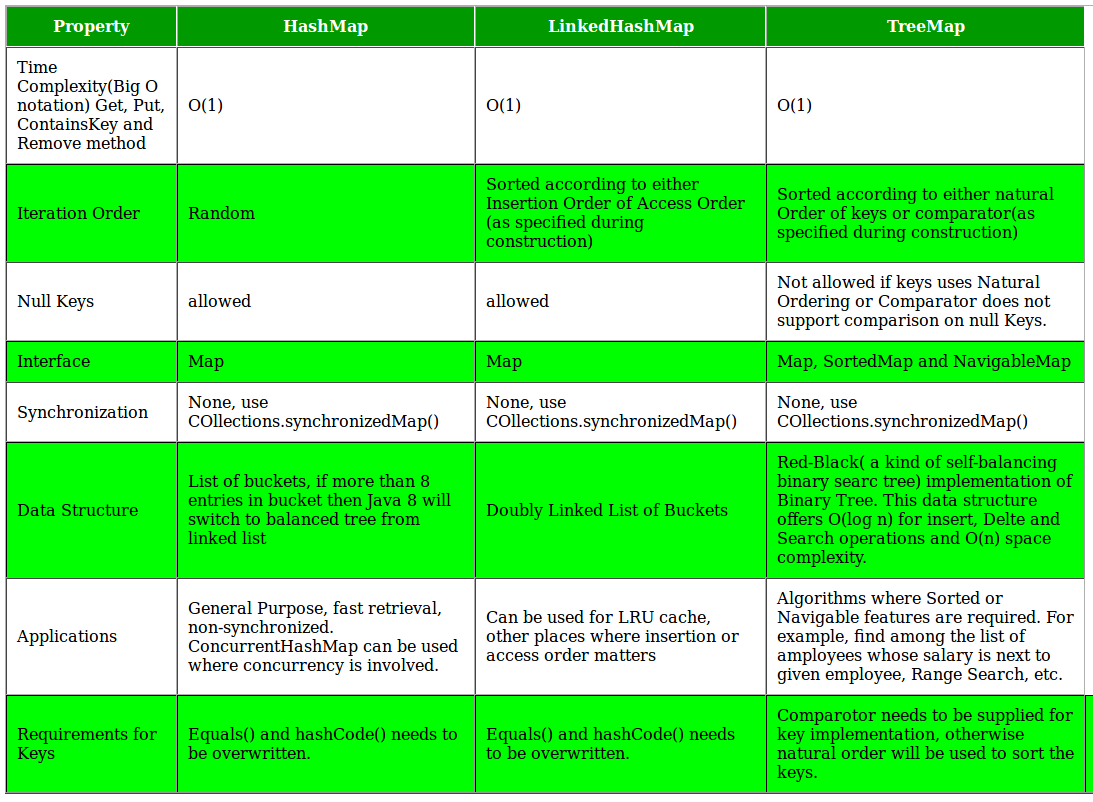
Internal Working of HashMap
-----------------------------
index = hashCode(key) & (n-1).
int hash
K key
V value
Node next
/custom Key class to override hashCode()
// and equals() method
class Key
{
String key;
Key(String key)
{
this.key = key;
}
@Override
public int hashCode()
{
return (int)key.charAt(0);
}
@Override
public boolean equals(Object obj)
{
return key.equals((String)obj);
}
}
- Its not recomened to use volatile since it ocuupies some memory leads to perfmomance issue
-----------------------
How to get bulk/more number of rows/records from database using Hibernate?
-With below will get Exceiption Exception in thread "main" java.lang.OutOfMemoryError: GC overhead limit exceeded
Session session = sessionFactory.getCurrentSession();
List<DemoEntity> demoEntitities = (List<DemoEntity>) session.createQuery("from DemoEntity").list();
for(DemoEntity demoEntity : demoEntitities){
//Process and write result
}
return null;
Solution:
---------
After running this we get:
StatelessSession statelessSession = sessionFactory.openStatelessSession(connection);


 try {


  DemoEntity demoEntity = (DemoEntity) statelessSession.createQuery("from DemoEntity where id = 1").uniqueResult();


  demoEntity.setProperty("test");


  statelessSession.update(demoEntity);


  ((TransactionContext) statelessSession).managedFlush();


 } finally {


  statelessSession.close();


}
in spring
@Autowired


private StatelessSession statelessSession;
this code will only work with the
JpaTransactionManager
it helps you getting rid of that manual evicting/flushing:
---------------------------END BULK OPERATIONS USING HIBERATE-------------
Advantage of java inner classes
There are basically three advantages of inner classes in java. They are as follows:
1) Nested classes represent a special type of relationship that is it can access all the members (data members and methods) of outer class including private.
2) Nested classes are used to develop more readable and maintainable code because it logically group classes and interfaces in one place only.
3) Code Optimization: It requires less code to write.
1. Diff b/w == and ===
In Js == makes comparision irrespective of its type
and === makes comparision by considering data type and value as well (Strtict comparision)
Internal Working of HashMap
-----------------------------
index = hashCode(key) & (n-1).
int hash
K key
V value
Node next
/custom Key class to override hashCode()
// and equals() method
class Key
{
String key;
Key(String key)
{
this.key = key;
}
@Override
public int hashCode()
{
return (int)key.charAt(0);
}
@Override
public boolean equals(Object obj)
{
return key.equals((String)obj);
}
}
- Calculate hash code of Key {“vishal”}. It will be generated as 118.
- Calculate index by using index method it will be 6.
- Create a node object as :
{ int hash = 118 // {"vishal"} is not a string but // an object of class Key Key key = {"vishal"} Integer value = 20 Node next = null } - Place this object at index 6, if no other object is presented there.
Now HashMap becomes :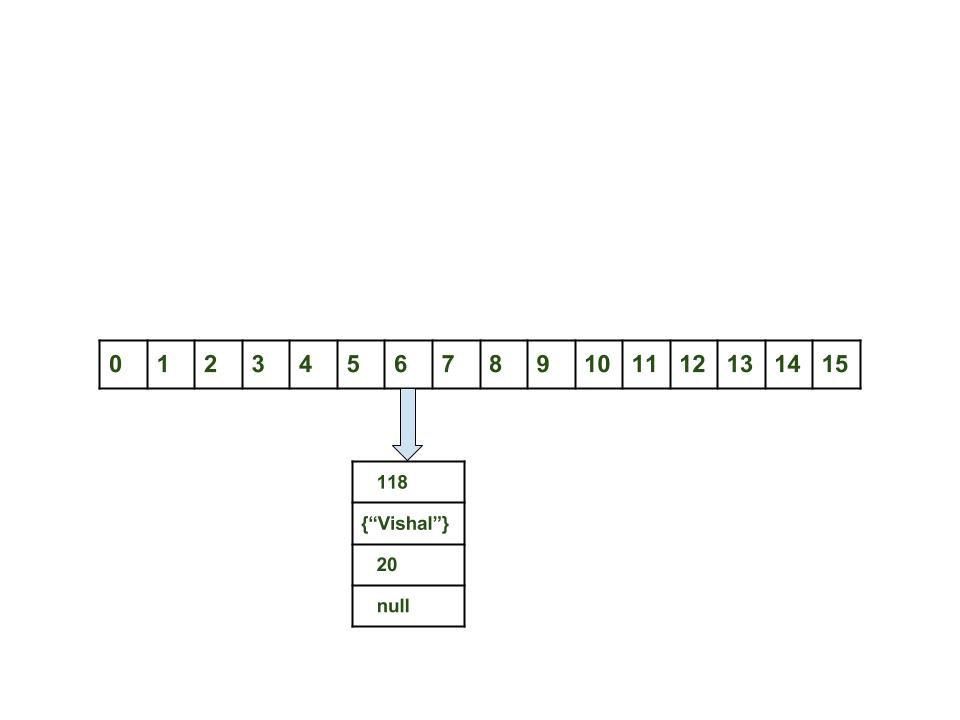
Steps:
- Calculate hash code of Key {“vaibhav”}. It will be generated as 118.
- Calculate index by using index method it will be 6.
- Create a node object as :
{ int hash = 118 Key key = {"vaibhav"} Integer value = 40 Node next = null } - Place this object at index 6 if no other object is presented there.
- In this case a node object is found at the index 6 – this is a case of collision.
- In that case, check via hashCode() and equals() method that if both the keys are same.
- If keys are same, replace the value with current value.
- Otherwise connect this node object to the previous node object via linked list and both are stored at index 6.
Now HashMap becomes :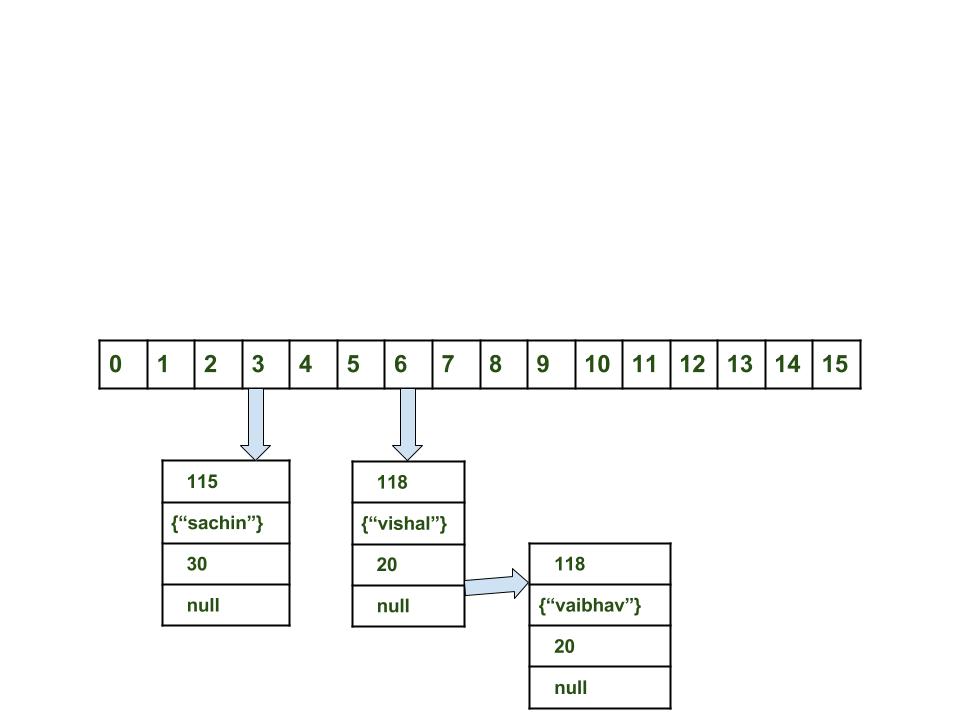
- Time complexity is almost constant for put and get method until rehashing is not done.
- In case of collision, i.e. index of two or more nodes are same, nodes are joined by link list i.e. second node is referenced by first node and third by second and so on.
- If key given already exist in HashMap, the value is replaced with new value.
- hash code of null key is 0.
- When getting an object with its key, the linked list is traversed until the key matches or null is found on next field.
Important Points
| EATURES | HASHSET | LINKEDHASHSET | TREESET |
|---|---|---|---|
| Internal Working | HashSet internally uses HashMap for storing objects | LinkedHashSet uses LinkedHashMap internally to store objects | TreeSet uses TreeMap internally to store objects |
| When To Use | If you don’t want to maintain insertion order but want store unique objects | If you want to maintain insertion order of elements then you can use LinkedHashSet | If you want to sort the elements according to some Comparator then use TreeSet |
| Order | HashSet does not maintain insertion order | LinkedHashSet maintains insertion order of objects | While TreeSet orders of the elements according to supplied Comparator. Default, It’s objects will be placed in their natural ascending order. |
| Complexity of Operations | HashSet gives O(1) complicity for insertion, removing and retrieving objects | LinkedHashSet gives insertion, removing and retrieving operations performance in order O(1). | While TreeSet gives performance of order O(log(n)) for insertion, removing and retrieving operations. |
| Performance | HashSet performance is better according to LinkedHashSet and TreeSet. | The performance of LinkedHashSet is slow to TreeSet. The performance LinkedHashSet is almost similar to HashSet but slower because, LinkedHashSet maintains LinkedList internally to maintain the insertion order of elements | TreeSet performance is better to LinkedHashSet excluding insertion and removal operations because, it has to sort the elements after each insertion and removal operations. |
| Compare | HashSet uses equals() and hashCode() methods to compare the objects | LinkedHashSet uses equals() and hashCode() methods to compare it’s objects | TreeSet uses compare() and compareTo() methods to compare the objects |
| Null Elements | HashSet allows only one null objects | LinkedHashSet allows only one null objects. | TreeSet not allow a any null objects. If you insert null objects into TreeSet, it throws NullPointerException |
| Syntax | HashSet obj = new HashSet(); | LinkedHashSet obj = new LinkedHashSet(); | TreeSet obj = new TreeSet(); |
Double-Checked Locking with Singleton
we could instead start by verifying if we need to create the object in the first place and only in that case we would acquire the lock.
Going further, we want to perform the same check again as soon as we enter the synchronized block, in order to keep the operation atomic:
1
2
3
4
5
6
7
8
9
10
11
12
13
14
15
| public class DclSingleton { private static volatile DclSingleton instance; public static DclSingleton getInstance() { if (instance == null) { synchronized (DclSingleton .class) { if (instance == null) { instance = new DclSingleton(); } } } return instance; } // private constructor and other methods...}Destroy singleton property :1.Refelection - with Enum since Enum is constant how destoryin: With constructors 2.Serilazation - readResolve() how destorying: (Singleton) objInputStream.readObject();2.cloning - cloneNotSupportentExcpetion for clone()how destroying: instance2 = (Singleton) instance1.clone(); |
One thing to keep in mind with this pattern is that the field needs to be volatile to prevent cache incoherence issues.
Volatile Variable:
Can share the same Object Instance variable in different Process Threads without any difficulty
Volatile Variable:
Can share the same Object Instance variable in different Process Threads without any difficulty
Best for Collections and Threads
Subscribe to:
Comments (Atom)